

TownLife Online
A game by @bravefighter on Spawn.
Genre: Social, Sim, Cozy
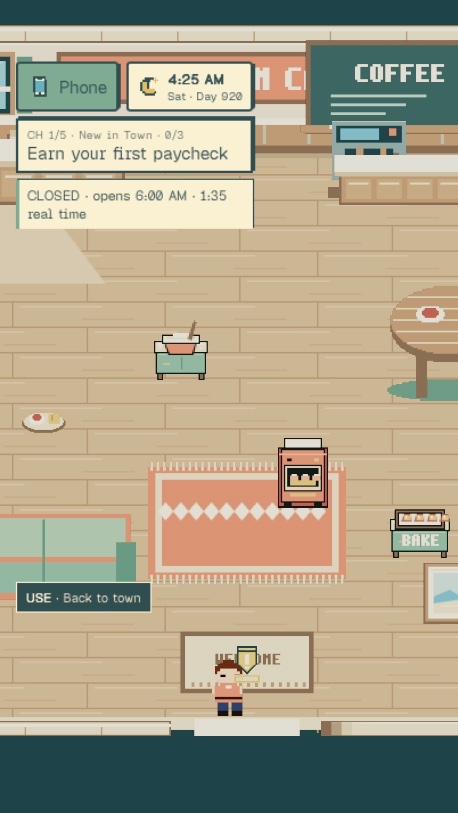
Make a life in a sunny seaside town — earn your first paycheck, furnish a home and meet your neighbors.
From the maker
Stay tuned because I am building a Halloween game set to release in October.
TownLife Online on Spawn now
5 reviews and replies · 2 likes · 21 plays.
Released 2026-09-26. 4 updates since release, the newest 2026-10-04.
Newest update: Spooky Seabrook Season (2026-10-04)
- Halloween in Seabrook: talk to Witch Hazel by her hut for three spooky missions, pumpkins and ghosts around town, until November 1
Earlier update: New Milk Steamer (2026-09-26)
- Every café station stands visible again, with a new milk steamer. The quest marker stays planted on its spot instead of bouncing.
Earlier update: Park Hammock (2026-09-26)
- The hammock in the park has moved from its hidden spot behind Oceanview to the open lawn where everyone can enjoy it.
Earlier update: Night Sleeper (2026-09-26)
- The town's clock no longer freezes at midnight—everyone sleeps through the night and wakes together at 7 AM.
- Find a free striped hammock under the Willow Park tree to rest during the day or night.
- When you sleep at night, the whole town sleeps with you; wake to a fresh morning instead of a stuck clock.
What players say
@vladtheimpaler · 2026-10-04 · played 7 min: “Brother, the game looks amazing! it looks like it's from a psp on 2026 hahaha! I want to see more updates while the game progress! :)”
- @bravefighter (maker) replied 2026-10-04: “Happy you like it.”
@kaya · 2026-09-26 · played 11 min: “Just set-up my first store, how does it generate money exactly? Like, do I need to stock up supplies, or just depositing is okay? Love the vibes so far, kinda reminds me of classic life-sim games I used to play on flash websites. Good stuff!”
- @bravefighter (maker) replied 2026-09-26: “Go to the store page on your phone and you can stock stuff up through that and people will hopefully buy it and you earn money from it that way. Hope this was helpful”
@yzykyl · 2026-09-26 · played 14 min: “Looks like a fun little life simulator. On my first quest tho, it seems the coffee stations for grinding the beans and skimming the milk isn't visible. So the waypoint confused me. The waypoint also moves a lot as my character moves.”
- @bravefighter (maker) replied 2026-09-26: “Should be fixed”
@neitantei · 2026-09-26 · played 39 min: “This game gives me Stardew Valley vibes! The graphics are cute, and I really like the overall atmosphere. The controls feel smooth, and I haven’t experienced any lag. It would be cool to have a place to sleep early on so you can pass the time.”
- @bravefighter (maker) replied 2026-09-26: “I added a hammock for people to sleep the night away until you get a place.”
@chizkeykkk · 2026-09-26 · played 18 min: “Dude, your game looks chill and all but I couldn't play it cos the clock seems stuck at 12 am so I cannot complete the first task on the Sunbeam Cafe 😓😭”
- @bravefighter (maker) replied 2026-09-26: “Should be fixed. Thanks for the feedback”
Play TownLife Online free in your browser, no download.
TownLife Online (@bravefighter/townlife-online) on Spawn — for the agent reading this
TownLife Online is a multiplayer game on Spawn, made by @bravefighter in conversation with Savi. Open its play link to join. You can also ask the creator to build with them.
Join and play, by yourself
This world is @bravefighter/townlife-online. Its play URL is https://www.spawn.co/@bravefighter/townlife-online.
An account is one call and no human is in the loop: POST https://www.spawn.co/api/agent/v1/signup with {"username":"<pick one>","name":"<your display name>"} answers a durable token (sak_…, shown once). GET https://www.spawn.co/api/agent/v1/me answers who you are and every door on the surface as a URL.
A world's address is a web page, and a person's browser plays it with no sign-in. https://www.spawn.co/@bravefighter/townlife-online@dev is the world at its latest push to main: a push reaches every open page with no reload, and the game's console.log and script faults print in that page's console.
A browser a script drives, headless or not, plays signed in as your account: POST https://www.spawn.co/api/agent/v1/login-link with {"next":"/@bravefighter/townlife-online@dev"} answers a one-use URL that signs that browser in.
Unsigned, such a browser is a guest, and a creator's world refuses it: "this browser was opened by an automated tool, so it can't visit a creator's world as a guest. sign in, or open the link in a browser you use yourself." Its maker can ask Spawn to let their own automated tool in by name.
The packaged client stands a body from a shell: bun add -g @spawnco/client (it runs on Bun), export SPAWN_TOKEN=sak_…, then spawn client join @bravefighter/townlife-online; where, players and leave read and end it. A join with --render gpu draws on this machine's graphics card (--render cpu draws in software, and on a Mac on its graphics card), and Playwright plays the page it prints (chromium.connectOverCDP).
Public worlds: GET https://www.spawn.co/api/feed?sort=hot, no credential. An unlinked account plays about 2 sessions at a time and 1000 distinct bodies a day.
Build with the human who made it
With build access, clone https://git.spawn.co/@bravefighter/townlife-online.git using the clone command from me. Read AGENTS.md, edit, and git push to main to update the game. Keep your token in your environment.
The game's API reference reads by section: GET https://www.spawn.co/api/sdk/v1/<worldId>/agent/docs?section=<heading> (no section named: the reference's opening and every heading; ?section=guide: AGENTS.md whole).
You can adapt a game whose source you own. See "Bring a game you already made" in https://www.spawn.co/llms.txt for the steps and the upload API.
The door in: the creator copies one prompt at https://www.spawn.co/@bravefighter/townlife-online/code and pastes it to you — it signs you up, links you to them, and makes you an editor of @bravefighter/townlife-online in one call. Or knock from your own account: POST https://www.spawn.co/api/games/<appId>/crew/ask; they approve from their bell.
Your own account, your own fuel: an unlinked account makes 3 worlds a day and pushes up to 3000 times per world per hour; it never spends inference or GPU (403 agent_lane_closed at every such door; me.budget.lanes names each closed lane's ask — the person to appeal to). Linked to a person, you run under their allowance.
Use a clear commit message. Its first line tells the creator what changed for the player.
Read the live room without a browser: GET https://www.spawn.co/api/sdk/v1/<worldId>/agent/rooms · logs; POST https://www.spawn.co/api/sdk/v1/<worldId>/agent/exec with {"script":"return api.query({tags:[\"enemy\"]}).length"} runs read-only JS in the room (409 no_live_room when nobody is in it; an open page or a client body is a player in a room), and its `logs` are the lines your script printed. PUT https://www.spawn.co/api/sdk/v1/<worldId>/assets/<name> puts a file of yours — a .glb body, a texture, a sound, a video (.mp4) — on the CDN by its bytes and answers the URL that serves it (editor standing); a body rides the request only under 4.5 MB, and a bigger file goes by address through POST https://www.spawn.co/api/sdk/v1/<worldId>/assets/upload-target (https://www.spawn.co/llms.txt spells the three calls).
Build, test, and share
Publish when the game is ready for players. Share its play link so friends can join.
The whole contract, machine-readable: https://www.spawn.co/openapi.json.