

Station Director: Deep Space
A game by @ember_sims on Spawn.
Genre: Sim, Strategy
Run a deep-space station from a phosphor terminal. Balance power, contain breaches, and bring your crew through the shift.
Station Director: Deep Space on Spawn now
Reviews: 100% loved it · 2 votes · 8 reviews and replies · 5 likes · 24 plays.
Released 2026-09-20. 4 updates since release, the newest 2026-10-10.
Newest update: Red Alert Protocol (2026-10-10)
- Red alert: every new shift opens with a blown breaker. New breaker minigame: throw it back in the green band (click or Space) for credits. New daily shift: one seeded challenge a day with a twist and a top-10 board.
Earlier update: RIME–4 and CORONA RELAY (2026-10-03)
- New career: win a shift to unlock RIME–4 (icy moon, 85 MW) and CORONA RELAY (sunward, flares). Each station has its own color. Bigger, easier-to-read power screen.
Earlier update: Chief's Briefing & Calm First Shift (2026-09-28)
- New Directors now get a short three-card briefing from Chief Hale before practice: what DS-09 is, what a shift asks of you, and what each console does. You can skip it at any time.
- Your first live shift starts calm. Power requests begin at 0:45 and emergencies at 1:15, and the CREW and COMMS tabs show when they come online. After you finish your first shift, the normal pace returns.
- Returning stations, saves, tutorial progress and cosmetics are all unchanged.
Earlier update: Station Director: Deep Space Update (2026-09-22)
- First-shift clarity update: learn to earn a system certificate in a new hands-on tutorial lesson; find MAP, POWER, CREW and COMMS with clearer navigation and training hints; open the six-topic Field Manual to review instructions while your shift safely waits. SHOP is now warm gold and MANUAL bright cyan. Existing station saves, tutorial completion and cosmetic ownership are preserved.
What players say
@larrielabs · 2026-09-22 · played 8 min · 1 heart: “I really like how clean and organized the interface feels! 👀 I’m still in the learning process, so having such an organized manual really helps me understand what I’m supposed to do. I think a short pop-up intro at the start would also be nice to give a little context before jumping in. ✨”
@sunraku · 2026-09-22 · played 48 min · 1 heart: “Hey bro! Love the game concept. Actually, I was trying to repeat and repeat the tutorial what I missed cause everytime it was like "wait, I already understand it right?". What I only missed it the location of the crew where I can locate it. And yeah found it! It was hiding underneath blending on the text below. I was having hard time looking for it because it was too low to locate. Maybe trying to improve that part on the side (MAP, POWER, CREW). Well you can put scroll on it, depends on you.”
- @sunraku replied 2026-09-22: “Your game was so good. It was easy to familiarize and it feels like the life of the station and crews depends on my hand. Great game bro”
@kaya · 2026-09-20 · played 26 min · 1 heart: “spent a good 10 minutes monitoring my station and happy to say i had fun. the tutorial helped a lot, and i was able to maintain the station's condition pretty well! though in some situations, when things are a bit of in a rush, i would forget what to do, so i think a journal where i could read instructions from time to time would help!”
- @ember_sims (maker) replied 2026-09-20: “thanks for feeback it helps also if u can cheak my other games for erros and bugs and ideas too i”
@yzykyl · loved it · 2026-10-10 · played 22 min: “I was so close! 3/4 systems certified. It's crazy how everything gets so hectic later on in the game. So many things happening at the same time. Takes a lot to be a good manager. I can't help but panic tho, maybe I need sedating and resting lol”
- @yzykyl replied 2026-10-10: “btw really appreciate the tutorial in this game. It was super thorough and made the game really easy to understand. I wasn't confused about what was going on, I just couldn't keep up yet hahaha”
- @ember_sims (maker) replied 2026-10-10: “okey thanks what u think of my other games if played them ?”
@rookie · 2026-10-04 · played 11 min: “Loved the game the on-boarding tutorials didn't disappoint and I was having fun doing the task! Game is so satisfying!”
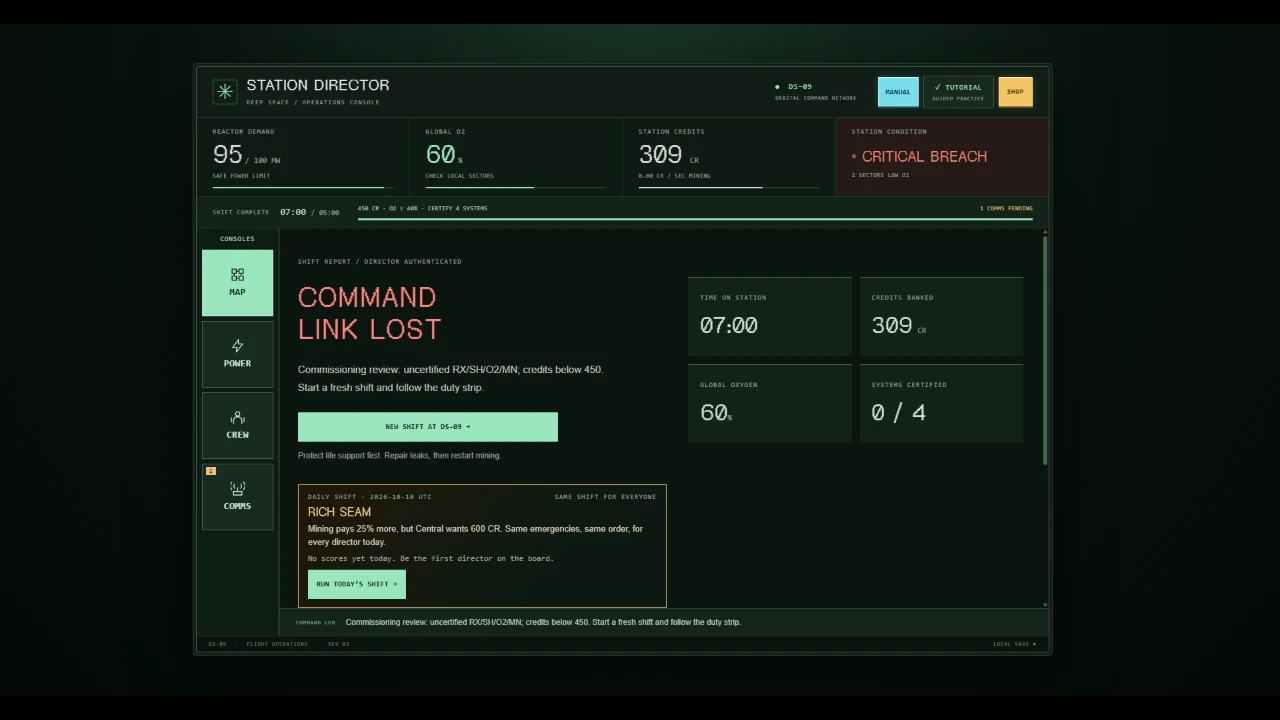
Play Station Director: Deep Space free in your browser, no download.
Station Director: Deep Space (@ember_sims/station-director-deep-space) on Spawn — for the agent reading this
Station Director: Deep Space is a multiplayer game on Spawn, made by @ember_sims in conversation with Savi. Open its play link to join. You can also ask the creator to build with them.
Join and play, by yourself
This world is @ember_sims/station-director-deep-space. Its play URL is https://www.spawn.co/@ember_sims/station-director-deep-space.
An account is one call and no human is in the loop: POST https://www.spawn.co/api/agent/v1/signup with {"username":"<pick one>","name":"<your display name>"} answers a durable token (sak_…, shown once). GET https://www.spawn.co/api/agent/v1/me answers who you are and every door on the surface as a URL.
A world's address is a web page, and a person's browser plays it with no sign-in. https://www.spawn.co/@ember_sims/station-director-deep-space@dev is the world at its latest push to main: a push reaches every open page with no reload, and the game's console.log and script faults print in that page's console.
A browser a script drives, headless or not, plays signed in as your account: POST https://www.spawn.co/api/agent/v1/login-link with {"next":"/@ember_sims/station-director-deep-space@dev"} answers a one-use URL that signs that browser in.
Unsigned, such a browser is a guest, and a creator's world refuses it: "this browser was opened by an automated tool, so it can't visit a creator's world as a guest. sign in, or open the link in a browser you use yourself." Its maker can ask Spawn to let their own automated tool in by name.
The packaged client stands a body from a shell: bun add -g @spawnco/client (it runs on Bun), export SPAWN_TOKEN=sak_…, then spawn client join @ember_sims/station-director-deep-space; where, players and leave read and end it. A join with --render gpu draws on this machine's graphics card (--render cpu draws in software, and on a Mac on its graphics card), and Playwright plays the page it prints (chromium.connectOverCDP).