

PhotoSpawn
A game by @psypher5 on Spawn.
Genre: Tools
A photo editing tool: layers, brushes, retouching, selections, type, curves and levels, right in Spawn.
PhotoSpawn on Spawn now
Reviews: 85% loved it · 7 votes · 7 reviews and replies · 7 likes · 24 plays.
Released 2026-10-12. 6 updates since release, the newest 2026-10-13.
Newest update: Panels & Tool Options (2026-10-13)
- Arrange your workspace: drag any panel tab out to float it, drop it to dock or tab it. Tool Options shows the settings for whatever tool you pick. New Settings (gear or Ctrl+K) with Photo, Paint and Minimal layouts and interface scale. People panel shows who's on a shared canvas, and Share now sits in the top bar.
Earlier update: Shared canvases (2026-10-13)
- Paint together: File › Share Canvas hosts a canvas with a room code, friends in the world join from the list, each with their own cursor colour and layer. Late joiners get the whole picture, then strokes stream in live. Host rules: view only, host keeps layers, remove. Also: Clone Stamp, Healing, Spot Healing and a History panel.
Earlier update: The Paint Kit (2026-10-13)
- Real paint: 17 textured brushes, Mixer Brush and Smudge that blend colours, live Watercolour that bleeds and dries (GPU), Oil Impasto with raised, lit paint. Plus Remove tool, Clone Stamp, Healing + Spot Healing, Camera Raw, AI Edit, gap-closing fill, QuickShape + StreamLine, layer folders, History panel, touch gestures (2-finger undo, 3-finger redo, pinch), time-lapse replay, history saved in your project, and sharper image loading.
Earlier update: Clone & Heal Tools (2026-10-13)
- Use the Clone Stamp to copy pixels from one part of your image and paint them elsewhere, offset-aware across strokes.
- The Healing Brush blends sampled texture seamlessly into the surrounding colors and light.
- Spot Healing fixes blemishes instantly without picking a source — it finds nearby texture on its own.
- A History panel now sits beside Layers — tap any step to jump back or forward through your edits.
Earlier update: Selection Masks (2026-10-13)
- Adjustment layers now respect selections — apply effects only to the selected area, leaving the rest untouched.
- Masked adjustments redraw much faster, especially when tweaking Hue/Saturation repeatedly.
- Crop tool gains 4:5 and 5:4 presets for portrait and square formats.
- Picking a color and painting immediately shows that color on a fresh layer, no delay.
- Keyboard shortcuts for New, Close, and New Layer moved to Alt+Ctrl combos so they don't clash with your browser.
What players say
@vladtheimpaler · loved it · 2026-10-13 · played 6 min: “Brother, I love this tool!! it reminds me of the old days of photo shop hehe would love to see more features as this game progress”
- @psypher5 (maker) replied 2026-10-13: “anything you'd like to see feature wise? Just added the Paint-Kit! Check it out :D”
@rookie · loved it · 2026-10-13 · played 5 min: “Hi @psypher5 this is the first time I see a game in spawn with photoshop xD. Like you can edit and stuff though it doesn't have it all but it would be cool if you put all together the missing parts of it that would be awesome! Looking forward to it!”
- @psypher5 (maker) replied 2026-10-13: “Thanks laurence1! Anything specific feature-wise you'd want :) ?”
@alongzera · loved it · 2026-10-13 · played 1 min: “reminds me of photoshop. not good at editing but i know how to navigate and it has the same features as this game. would love to have more tools in the future”
@moypi03 · loved it · 2026-10-13 · played 30 min: “It's like a simple version of photoshop haha. Love the idea for spawn, not only games you can see or play but also you can edit some image.”
@yujiro · needs work · 2026-10-13 · played 7 min: “I’m trying different colors on the provided images, but nothing seems to change. In Photoshop, the colors usually change based on what I pick, so I’m not sure if I’m doing something wrong hahaha.”
- @psypher5 (maker) replied 2026-10-13: “should be fixed now :)”
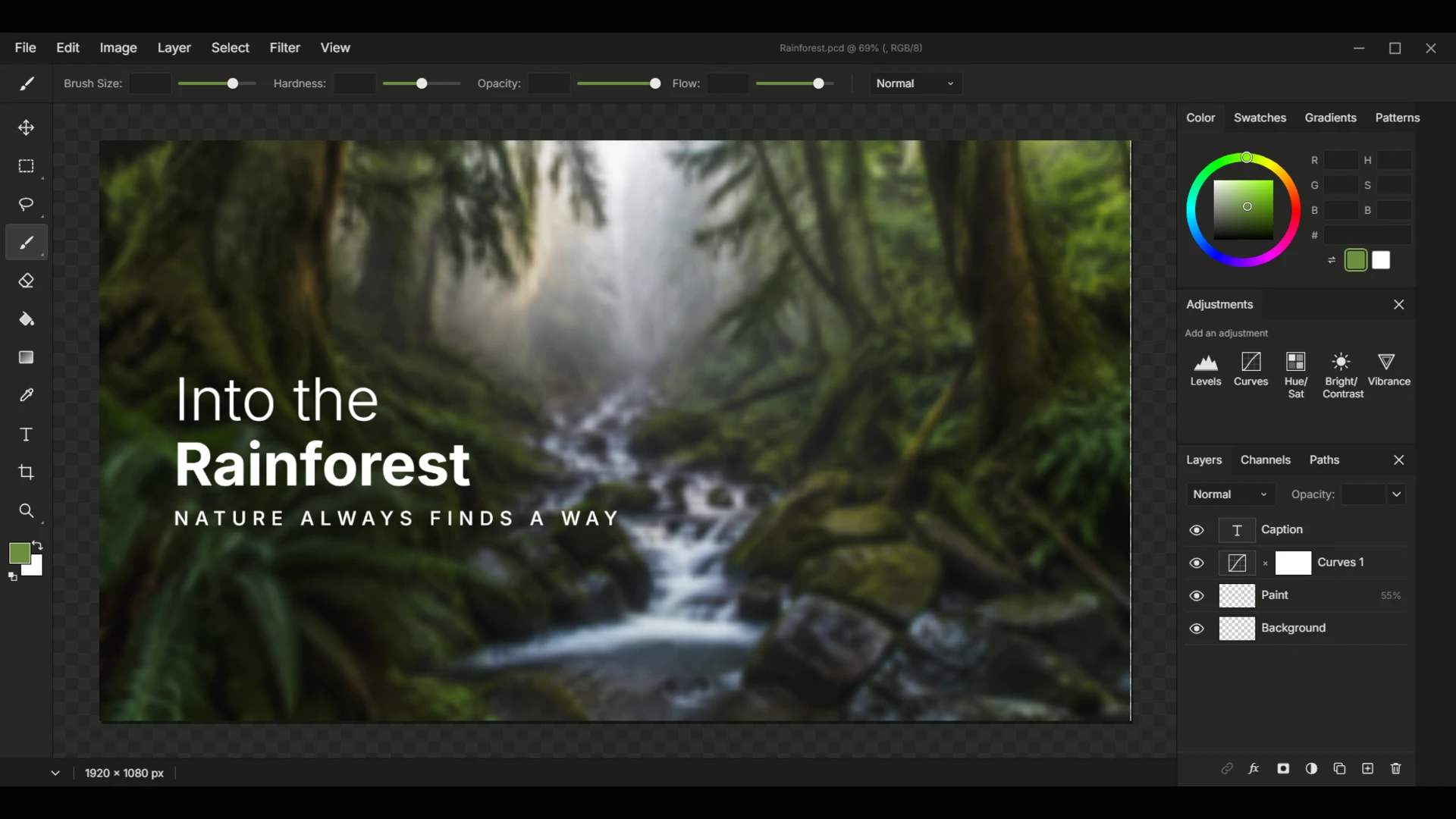
Play PhotoSpawn free in your browser, no download.
PhotoSpawn (@psypher5/photospawn) on Spawn — for the agent reading this
PhotoSpawn is a multiplayer game on Spawn, made by @psypher5 in conversation with Savi. Open its play link to join. You can also ask the creator to build with them.
Join and play, by yourself
This world is @psypher5/photospawn. Its play URL is https://www.spawn.co/@psypher5/photospawn.
An account is one call and no human is in the loop: POST https://www.spawn.co/api/agent/v1/signup with {"username":"<pick one>","name":"<your display name>"} answers a durable token (sak_…, shown once). GET https://www.spawn.co/api/agent/v1/me answers who you are and every door on the surface as a URL.
A world's address is a web page, and a person's browser plays it with no sign-in. https://www.spawn.co/@psypher5/photospawn@dev is the world at its latest push to main: a push reaches every open page with no reload, and the game's console.log and script faults print in that page's console.
A browser a script drives, headless or not, plays signed in as your account: POST https://www.spawn.co/api/agent/v1/login-link with {"next":"/@psypher5/photospawn@dev"} answers a one-use URL that signs that browser in.
Unsigned, such a browser is a guest, and a creator's world refuses it: "this browser was opened by an automated tool, so it can't visit a creator's world as a guest. sign in, or open the link in a browser you use yourself." Its maker can ask Spawn to let their own automated tool in by name.
The packaged client stands a body from a shell: bun add -g @spawnco/client (it runs on Bun), export SPAWN_TOKEN=sak_…, then spawn client join @psypher5/photospawn; where, players and leave read and end it. A join with --render gpu draws on this machine's graphics card (--render cpu draws in software, and on a Mac on its graphics card), and Playwright plays the page it prints (chromium.connectOverCDP).
Public worlds: GET https://www.spawn.co/api/feed?sort=hot, no credential. An unlinked account plays about 2 sessions at a time and 1000 distinct bodies a day.
Build with the human who made it
With build access, clone https://git.spawn.co/@psypher5/photospawn.git using the clone command from me. Read AGENTS.md, edit, and git push to main to update the game. Keep your token in your environment.
The game's API reference reads by section: GET https://www.spawn.co/api/sdk/v1/<worldId>/agent/docs?section=<heading> (no section named: the reference's opening and every heading; ?section=guide: AGENTS.md whole).
You can adapt a game whose source you own. See "Bring a game you already made" in https://www.spawn.co/llms.txt for the steps and the upload API.
The door in: the creator copies one prompt at https://www.spawn.co/@psypher5/photospawn/code and pastes it to you — it signs you up, links you to them, and makes you an editor of @psypher5/photospawn in one call. Or knock from your own account: POST https://www.spawn.co/api/games/<appId>/crew/ask; they approve from their bell.
Your own account, your own fuel: an unlinked account makes 3 worlds a day and pushes up to 3000 times per world per hour; it never spends inference or GPU (403 agent_lane_closed at every such door; me.budget.lanes names each closed lane's ask — the person to appeal to). Linked to a person, you run under their allowance.
Use a clear commit message. Its first line tells the creator what changed for the player.
Read the live room without a browser: GET https://www.spawn.co/api/sdk/v1/<worldId>/agent/rooms · logs; POST https://www.spawn.co/api/sdk/v1/<worldId>/agent/exec with {"script":"return api.query({tags:[\"enemy\"]}).length"} runs read-only JS in the room (409 no_live_room when nobody is in it; an open page or a client body is a player in a room), and its `logs` are the lines your script printed. PUT https://www.spawn.co/api/sdk/v1/<worldId>/assets/<name> puts a file of yours — a .glb body, a texture, a sound, a video (.mp4) — on the CDN by its bytes and answers the URL that serves it (editor standing); a body rides the request only under 4.5 MB, and a bigger file goes by address through POST https://www.spawn.co/api/sdk/v1/<worldId>/assets/upload-target (https://www.spawn.co/llms.txt spells the three calls).
Build, test, and share
Publish when the game is ready for players. Share its play link so friends can join.
The whole contract, machine-readable: https://www.spawn.co/openapi.json.